How alerts are raised
DBPulse raises alerts automatically as it collects data from each server. You do not need to build rules to get started — you will see alerts appear on the Alerts screen, on the server's detail page, and in the Critical and Warnings tiles on the Fleet screen.
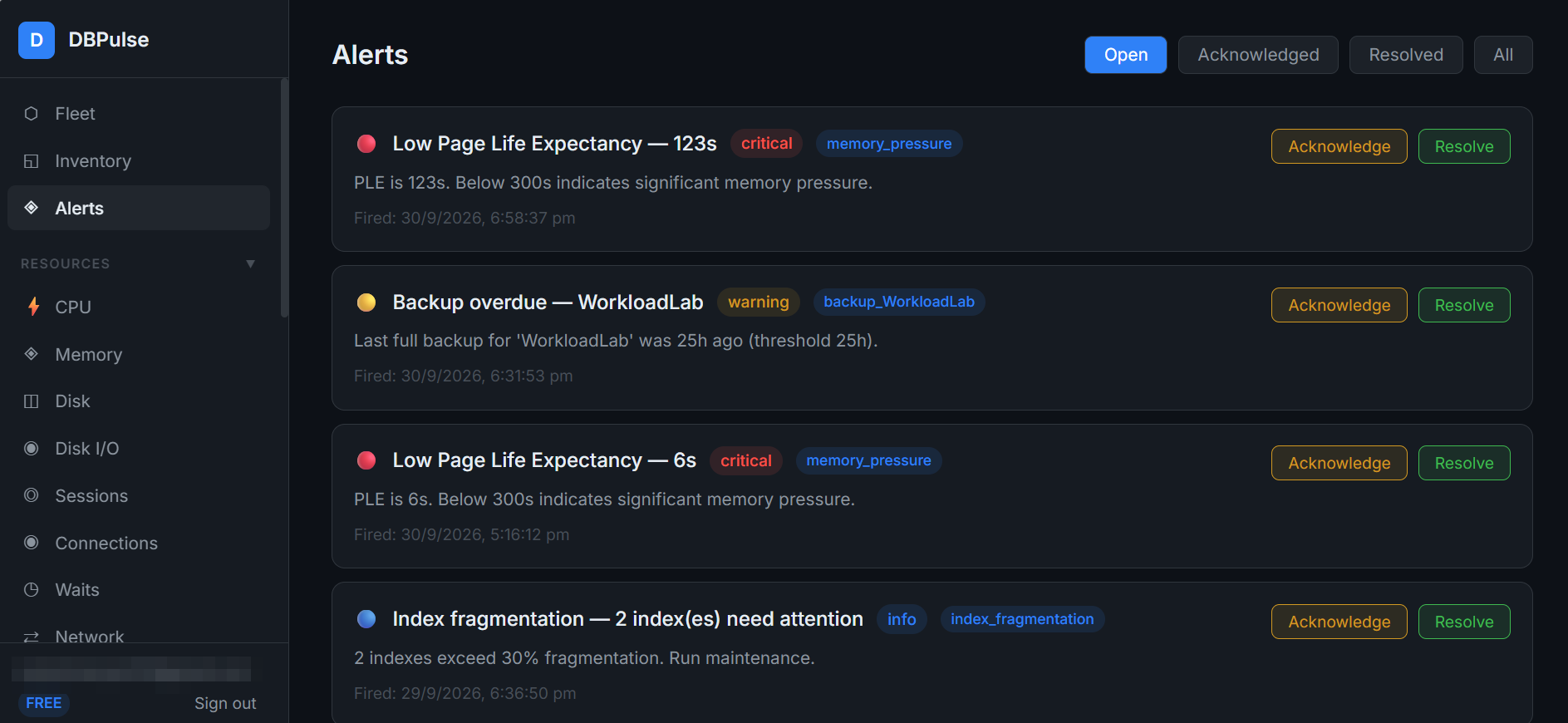
Alerts you will see
- Low Page Life Expectancy (critical, category
memory_pressure) — PLE is below 300 seconds. - Backup overdue (warning) — the last full backup of a database is older than its threshold (25 hours in the example).
- Index fragmentation (info) — indexes exceed 30% fragmentation.
- Long-running queries and No backup recorded also show up as open alerts on Server Detail.
Triage an alert
Open Alerts and use the filters Open, Acknowledged, Resolved and All.
- Acknowledge — tell the team you are looking at it.
- Resolve — close it once the underlying problem is fixed.
TipClick an alert's category or open the server's detail page to see the numbers behind it, then ask Doctor AI for a prioritised plan.
What is not available yet
Creating your own alert rules and notification channels (email, Slack, webhooks) is not available in the product today.